Technical SEO means improving a website’s structure, performance and indexability so Google can find, render, understand and index the right pages. It covers crawl control, Core Web Vitals, canonical tags, schema markup, HTTPS, URL structure and internal linking.
Without a working technical foundation, even strong content can stay invisible. Technical SEO is the part of small business SEO that makes the rest of the work possible.
What is technical SEO?
Technical SEO answers three basic questions:
- Can Google find your pages? That is crawlability.
- Can Google understand the content? That is rendering, structure and structured data.
- Can users actually use the page well? That is speed, mobile usability, stability and security.
Technical SEO is not the same as content writing or link building. It is infrastructure. Nobody buys a house because the wiring exists, but nothing works properly without it.
The main areas of technical SEO
Technical SEO is not one setting. It is a set of checks that lead to one outcome: important pages are discoverable, understandable and usable.
For an SMB website, the most important idea is prioritization. Fix issues that block crawling, indexing or page use before polishing smaller details.
| Area | What to check | Why it matters |
|---|---|---|
| Crawling and indexing | robots.txt, sitemap, noindex, Search Console indexing reports | Google cannot rank a page it cannot find or index |
| Canonicals and duplicates | self-referencing canonicals, URL variants, parameters | Ranking signals should concentrate on one preferred URL |
| URL structure | short, descriptive, stable URLs | Users and Google understand the topic before opening the page |
| Titles and meta descriptions | unique title tags, descriptions and SERP preview | Improves relevance and click-through potential |
| Speed and Core Web Vitals | LCP, INP, CLS, TTFB and rendering | Slow pages reduce user experience and can weaken rankings |
| Image optimization | format, size, alt text, lazy loading and dimensions | Large images are a common LCP problem |
| Mobile usability | responsive layout, tap targets and content parity | Google primarily evaluates the mobile version |
| Structured data | Article, BreadcrumbList, Organization, Service and FAQ where relevant | Helps Google and AI systems interpret entities |
| Internal linking | crawl depth, orphan pages and anchor text | Distributes authority and helps crawlers find pages |
Technical SEO foundation check
If the technical state of a site is unclear, start with these checks. They quickly show whether the problem is critical or mostly optimization work.
| Check | Healthy sign | Warning sign |
|---|---|---|
| Google Search Console | Important pages are indexed and errors are low | Sitemap URLs exist, but Google does not index them |
| Sitemap | Contains only published, indexable pages | Includes 404s, redirects or noindex pages |
| Robots.txt | Does not block CSS, JS, image or content paths | Important folders are blocked by accident |
| Canonical tags | Every page has the correct self-referencing canonical | Canonical points to a wrong page or a noindex page |
| Speed | LCP under 2.5 seconds and CLS under 0.1 on mobile | Hero image, fonts or scripts delay rendering |
| Internal links | Every important page is reachable within 1 to 3 clicks | Important pages are not linked from anywhere |
Crawling and indexing
Crawling is the starting point of technical SEO. If Google cannot find your pages, it cannot index them.
Googlebot discovers pages by following links, reading sitemaps and revisiting known URLs. It does not automatically find every useful page. Your job is to make sure it finds the right pages and avoids the waste.
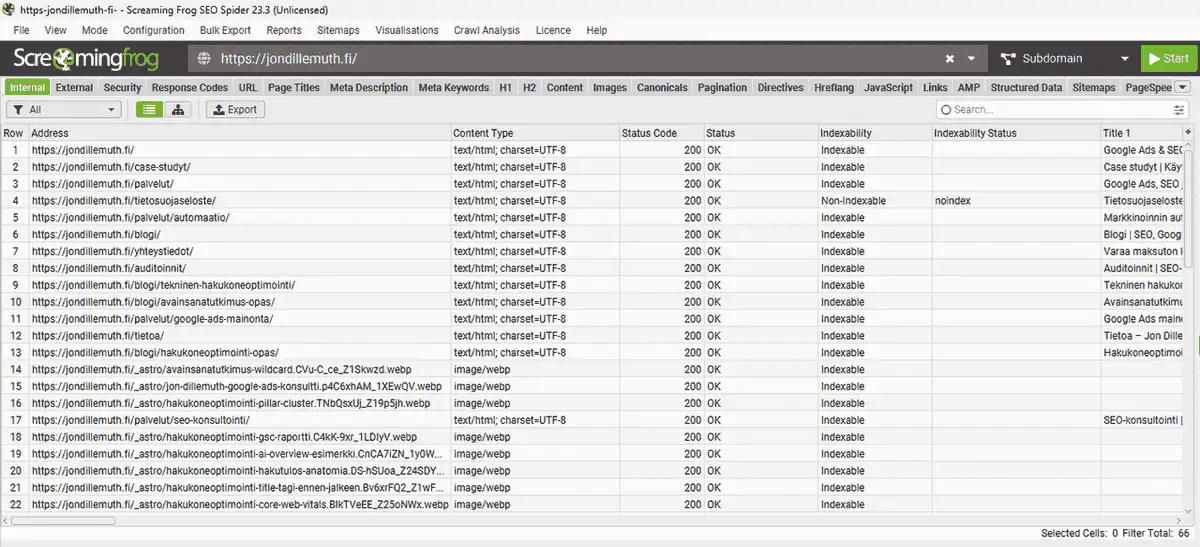
Example from this site: a Screaming Frog crawl on April 19, 2026 found 238 internal URLs: 33 HTML pages and 202 images. Crawl time was 3 minutes, 99.6% of responses were under 1 second, and 0 pages were blocked by robots.txt. That is a healthy base: Googlebot can access the site without wasting time on unnecessary URL variants.
Robots.txt
Robots.txt is a text file at the root of a site. It tells search engines which paths they may crawl. It is not a security mechanism. Google may still index a blocked URL if other pages link to it, but it usually cannot see the full content.
Common rules:
- Allow: / allows crawling across the site.
- Disallow: /admin/ blocks admin paths.
- Sitemap: tells crawlers where the XML sitemap is.
A common mistake is blocking CSS or JavaScript files. Then Google cannot render the page correctly. Use URL Inspection in Google Search Console to check whether Google sees the same page a user sees.
User-agent: *
Allow: /
Sitemap: https://example.com/sitemap-index.xml

User-agent: GPTBot
Allow: /

User-agent: OAI-SearchBot
Allow: /

User-agent: PerplexityBot
Allow: /
AI crawlers are worth deciding on explicitly. Some CDN services can block them automatically, so robots.txt is only one layer of the setup.
XML sitemap
An XML sitemap lists the pages you want search engines to discover and index. It does not guarantee indexation, but it helps Google find new or updated URLs and understand the structure of the site.
A good sitemap:
- contains only indexable pages
- excludes 404s, redirects and noindex URLs
- uses meaningful
lastmoddates - is referenced in robots.txt
- is submitted in Google Search Console
Check the sitemap early in a technical audit. If it is polluted with redirects, noindex pages or deleted content, Google receives a noisy map.
Indexing issues
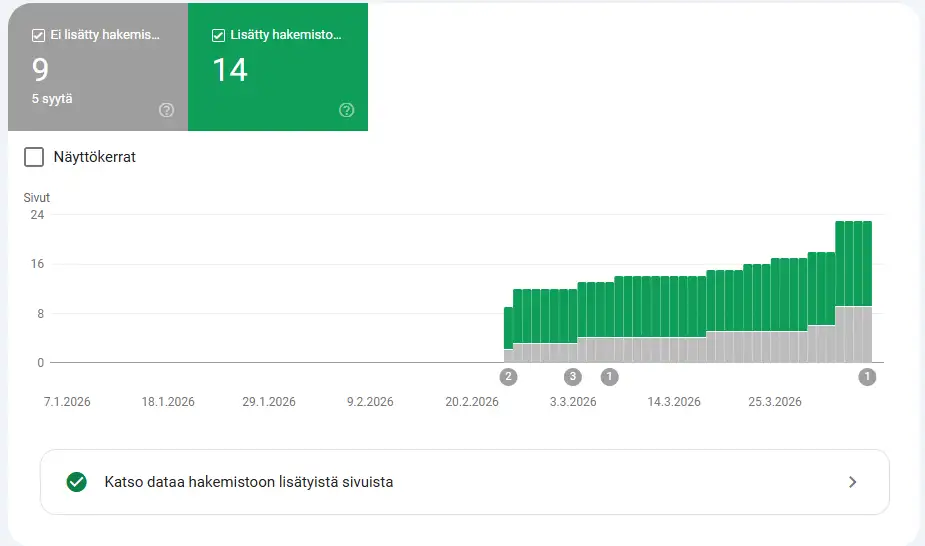
Google Search Console shows which pages are indexed and which are excluded.
Common reasons a page is not indexed:
| Reason | Fix |
|---|---|
| Noindex tag | Remove noindex if the page should rank |
| Canonical points elsewhere | Check whether the canonical target is correct |
| Soft 404 | Add real content or return a correct error status |
| Crawl error | Fix 5xx errors, timeouts or blocked resources |
| Thin content | Improve the page or remove it from the index |
Canonical tags
A canonical tag tells Google which version of a page is the preferred one. This matters because the same content can appear under several URLs:
https://example.com/pageandhttps://example.com/page/http://andhttps://www.and non-www- parameters such as
?ref=emailor?utm_source=linkedin
Without a canonical, Google may split ranking signals across several versions instead of concentrating them on one URL.
Correct implementation
Every indexable page should include a self-referencing canonical:
<link rel="canonical" href="https://example.com/blog/article/" />Self-referencing means the page points to itself. It is also useful on pages without obvious duplicates because it removes ambiguity.
From this site’s crawl data: Screaming Frog on April 19, 2026 found self-referencing canonicals on 32/32 pages. There were 0 missing, 0 conflicting and 0 relative canonicals. Astro’s trailingSlash: "always" setting normalizes trailing slashes, and canonicals are generated during the build. That eliminates a whole class of duplicate URL issues.
Common mistakes
- Relative canonical:
<link rel="canonical" href="/">may work, but an absolute URL is safer. - Canonical points to a noindex page: Google receives a contradictory signal.
- Canonical points to different content: Google may ignore it.
- Canonical is missing: Google decides the preferred version itself.
URL structure
A good URL tells both Google and the user what the page is about before either has opened it.
URL structure affects how Google understands hierarchy and how users understand where they are on the site.
This site’s URL structure: three levels, clear hierarchy. Services use /services/seo-consulting/, blog posts use /en/blog/technical-seo/, and case studies use /en/case-studies/. URLs are short, descriptive, lowercase and use hyphens.
Principles of a good URL
- Short and descriptive:
/en/services/seo-consulting/is clear. - Contains the topic: the primary keyword in the URL supports relevance.
- Logical hierarchy:
/en/blog/technical-seo/is better than/p/12345/. - Lowercase and hyphenated:
technical-seo, notTechnical_SEO. - No unnecessary parameters: tracking or session parameters should not create indexable variants.
User-friendly permalinks
| Check | Good implementation | Risk |
|---|---|---|
| Length | /en/blog/technical-seo/ | Long path with dates, category names and filler words |
| Characters | lowercase letters, numbers and hyphens | uppercase, underscores or special characters |
| Hierarchy | important page within 1 to 3 levels | deep path that is not visible in navigation |
| Stability | URL does not change after a small title update | year or campaign name forces later redirects |
Common mistakes include WordPress default URLs such as /?p=123, overly deep paths, dates in URLs and non-ASCII characters that make sharing messier.
Title tags, meta descriptions and SERP appearance
Titles and meta descriptions are not only copywriting. They are also a technical check: does the site generate a unique title, correct canonical and useful search snippet for every indexable page?
A good title tells the main topic and sets the right expectation. A good meta description explains why the page is worth opening. Google may rewrite it, but your description gives the baseline.
| Element | Check | Fix |
|---|---|---|
| Title | Every indexable page has a unique title | Create a title template and check duplicates with Screaming Frog |
| H1 | The page has one main heading that matches the topic | Avoid multiple H1s inside reusable components |
| Meta description | Description is unique and matches search intent | Write key service and article pages manually |
| SERP appearance | Title does not truncate badly and description promises the right thing | Test priority pages with a SERP preview tool |
Do not optimize title tags away from the content. If the title promises a technical SEO checklist, the page needs an actual checklist. Otherwise CTR may rise briefly while users leave quickly.
Duplicate content
Duplicate content splits authority across several URLs instead of consolidating link equity on one preferred page.
It does not always come from copying. Often the site platform creates duplicates automatically.
From this site’s crawl data: Screaming Frog on April 19, 2026 found 0 exact duplicates, 0 near duplicates and 0 semantically similar pages. The reason is configuration: trailing slash normalization, self-referencing canonicals and HTTPS-only redirects.
How duplicates are created
wwwand non-www- HTTP and HTTPS
- trailing slash variants
- URL parameters such as
?sort=priceor?page=1 - ecommerce products available under several category paths
- print views or archive pages
Why duplicates matter
- Link equity is split between several versions.
- Crawl budget is wasted on repeated content.
- Google may choose the wrong version for search results.
| Problem | Fix |
|---|---|
| www vs non-www | 301 redirect to one version |
| HTTP vs HTTPS | 301 all HTTP traffic to HTTPS |
| URL parameters | Canonical points to the clean URL |
| Ecommerce product duplicates | Canonical to the main product URL, or noindex weak variants |
| Thin duplicate | 301 to the main version or noindex |
Thin content
Thin content means a page has so little useful substance that Google does not consider it worth indexing or ranking well. It is not the same as duplicate content, but the fix depends on page type in a similar way.
| Page type | Fix |
|---|---|
| Listing page | Add a useful intro that explains what the category covers |
| Unnecessary archive, tag or parameter page | Noindex it or remove it |
| Valuable but thin service or product page | Add substance: what it includes, who it is for, what results to expect |
| Generated filter page | Canonical to the main version or noindex |
How Core Web Vitals affect rankings
Core Web Vitals is Google’s user experience measurement set. It evaluates loading performance, interaction responsiveness and visual stability.
The mobile targets are:
- LCP: under 2.5 seconds
- INP: under 200 milliseconds
- CLS: under 0.1
Core Web Vitals should not be treated as a vanity Lighthouse score. Use them to find the bottleneck that users actually feel.
LCP: Largest Contentful Paint
LCP measures how quickly the largest visible element, often a hero image or heading, loads.
Common LCP problems:
| Problem | Fix |
|---|---|
| Large images | WebP or AVIF, srcset, right dimensions, no lazy loading on the hero image |
| Slow server response | CDN, static generation, edge caching |
| Render-blocking CSS or JS | Inline critical CSS and defer JavaScript |
| Web fonts | font-display: swap or optional, preload where justified |
| Third-party scripts | Load analytics, ads and tags asynchronously |
INP: Interaction to Next Paint
INP measures how quickly a page reacts to clicks, keypresses and taps. It replaced FID in March 2024.
INP is usually a problem on sites with heavy client-side JavaScript. Static sites built with Astro, Hugo or plain HTML rarely struggle unless they add heavy widgets.
CLS: Cumulative Layout Shift
CLS measures how much elements jump during loading. Images without reserved space, late-loading ads and font swaps are common causes.
Fixes:
- add
widthandheight, or CSSaspect-ratio, to images - reserve fixed space for ads and embeds
- use
font-display: optionalorswapcarefully - reserve space for dynamic content before it loads
Speed measurement checklist
| Metric | Where to check | What it tells you |
|---|---|---|
| LCP | PageSpeed Insights, Search Console Core Web Vitals | How fast main content appears |
| INP | CrUX, Search Console Core Web Vitals | Whether the page responds quickly |
| CLS | PageSpeed Insights, Lighthouse | Whether layout shifts during load |
| TTFB | WebPageTest, Lighthouse, server logs | Whether the server delays the start |
| Render-blocking resources | Lighthouse and DevTools Network | Whether CSS, fonts or scripts block rendering |
Fix the biggest bottleneck first. If the LCP element is an 800 KB image, JavaScript cleanup will not solve the main problem. If TTFB is high, compressing images does not remove server slowness.
Practical example: jondillemuth.fi
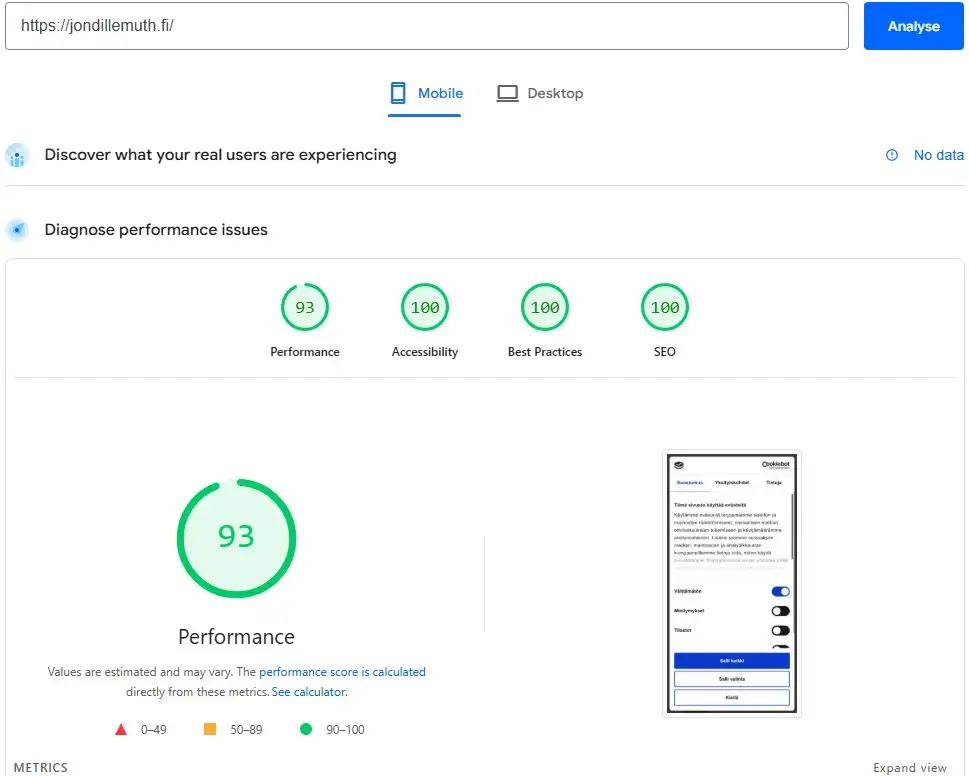
This site is built with Astro: static HTML and no client-side framework for critical content. After launch, the mobile score was 93/100 and desktop was 99/100.
After optimization, the result was 100/100 on mobile:
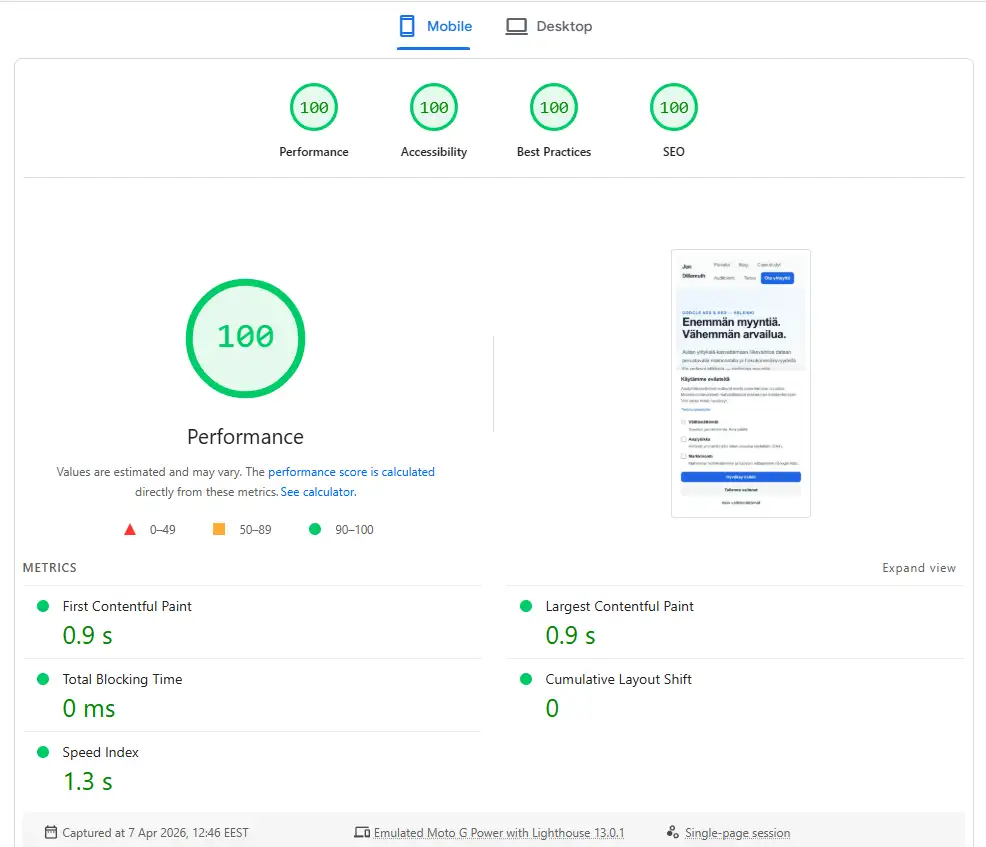
| Metric | Baseline mobile | Current mobile |
|---|---|---|
| Performance | 93/100 | 100/100 |
| LCP | 1.2 s | 0.8 s |
| CLS | 0 | 0 |
| TBT | 10 ms | 0 ms |
What changed:
- Font loading: switched
font-display: swaptooptionaland added preload where useful. - Inline CSS: inlined styles to remove the final render-blocking stylesheet.
- Speculation Rules: added navigation prefetching.
- Image optimization: used
fetchpriority="high"for the hero image and lazy loading elsewhere.
Small changes compounded. Each fix added 1 to 3 points. Together they took the score from 93 to 100.
Image optimization in technical SEO
Images are often the easiest technical win. They affect loading speed, LCP, accessibility and how Google understands the visual content of a page.
Good image optimization does not mean crushing every image as small as possible. It means the browser gets the right size in the right format, and Google receives useful context.
| Check | Good implementation | Why it matters |
|---|---|---|
| Format | AVIF or WebP, fallback if needed | Smaller file size without visible quality loss |
| Dimensions | width, height or CSS aspect-ratio | Prevents layout shifts |
| Responsiveness | srcset and sizes | Mobile users do not download desktop-sized images |
| Lazy loading | loading="lazy" below the fold | Saves bandwidth and speeds the first view |
| LCP image | fetchpriority="high" and no lazy loading | The largest visible element loads sooner |
| Alt text | Describes the image content and purpose | Improves accessibility and image search context |
| Filename | Descriptive name such as technical-seo-screaming-frog-crawl.webp | Adds contextual information |
A common mistake is lazy loading the hero image. That delays LCP because the browser receives permission to load it too late. Another common mistake is missing image dimensions, which makes text jump while images load.
Alt text should be accurate, not stuffed. “Screaming Frog crawl showing status codes and indexability” is useful. “technical SEO technical SEO Google SEO” is keyword stuffing.
Mobile-first indexing
Google has used mobile-first indexing for all sites since July 2024. The mobile version is the version Google evaluates.
This means:
- if content is missing on mobile, Google may not see it
- if the mobile site is slow, rankings can suffer even for desktop searches
- title, meta description and canonical tags should be consistent across mobile and desktop
Responsive design is the recommended approach. A separate mobile site, such as m.example.com, requires careful hreflang and canonical setup. Dynamic serving, where the same URL returns different HTML, is harder to maintain and easier to break.
Practical implication: do not hide important tables, FAQs or internal links on mobile. If they are missing from the mobile version, Google may not count them.
Mobile usability checks
- Tap target size: buttons and links should be large enough and spaced properly.
- Readable text: users should not need to pinch-zoom.
- No horizontal scrolling: elements should not overflow the viewport.
- No intrusive interstitials: full-screen popups that block content can harm mobile search experience.
HTTPS and security headers
HTTPS is a baseline requirement, not a competitive advantage. In 2026, a site without SSL creates browser warnings and trust problems before SEO even enters the conversation.
HTTPS has been a Google ranking signal since 2014. The certificate alone is not the whole setup. Security headers such as HSTS and CSP reduce risk and strengthen trust.
This site’s security state: 100% HTTPS, 0 mixed content warnings, 0 HTTP URLs, HSTS preload enabled and no missing critical security headers in the crawl.
Baseline
- SSL certificate: Let’s Encrypt is free, and most hosts install it automatically.
- HTTP to HTTPS redirect: all HTTP traffic should 301 to HTTPS.
- HSTS: tells browsers to use HTTPS.
- Mixed content: HTTPS pages should not load images, scripts or CSS over HTTP.
Additional headers
| Header | What it does |
|---|---|
| Content-Security-Policy | Controls where resources can load from and reduces XSS risk |
| X-Content-Type-Options: nosniff | Prevents MIME type sniffing |
| X-Frame-Options: SAMEORIGIN | Prevents the page from being embedded in iframes elsewhere |
| Referrer-Policy | Controls what information is sent when users click links |
SPF, DKIM and DMARC are not traditional SEO factors, but they affect brand trust. If your domain sends proposals, newsletters or reports, they should be configured properly.
Structured data in technical SEO
Structured data is JSON-LD markup that tells Google what a page represents: article, organization, service, local business, breadcrumb or another entity.
It does not directly push rankings upward, but it can enable rich results and helps search and AI systems interpret entities.
Important schema types for businesses
| Type | Use case | Rich result potential |
|---|---|---|
| Organization | Homepage: company name, logo, contact details | Knowledge Panel signals |
| LocalBusiness | Local companies: address, opening hours, service area | Maps and local results |
| FAQPage | FAQ content. General rich result visibility is now restricted mainly to government and healthcare sites | Limited for most sites |
| Article / BlogPosting | Blog articles: author, date, image | Article metadata |
| HowTo | Step-by-step instructions | Limited visible benefit for many sites |
| BreadcrumbList | Navigation path | Breadcrumb in search results |
| Service | Service pages: service type, price, area | Service context |
Implementation
Add structured data as JSON-LD in the page <head>. Google recommends JSON-LD because it is clearer to maintain than Microdata or RDFa.
Validate with Google Rich Results Test or Schema Markup Validator.
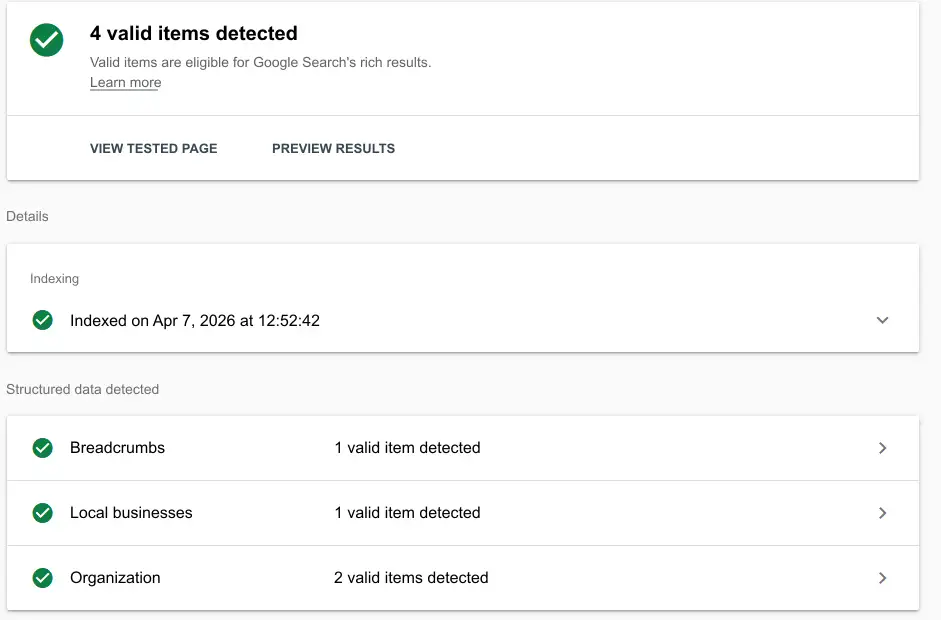
Validation result for this site: Screaming Frog on April 19, 2026 found JSON-LD on 32/32 pages, 0 validation errors, 0 parse errors and 0 validation warnings. The architecture is centralized: Organization, Person and LocalBusiness entities are defined once with @id, and other pages reference them.
Site architecture and internal linking
Site architecture means how pages are organized and how they link to each other. A good architecture serves users and crawlers at the same time.
Crawl depth
Crawl depth tells how many clicks are needed from the homepage to reach a page. As a rule of thumb, important pages should be no more than three clicks away.
This site’s crawl depth: the homepage is at depth 0, navigation pages at depth 1 and individual articles at depth 2. There are no important pages at depth 3 or deeper. Header navigation links to section pages, and section pages link to individual articles.
Internal links
Internal links distribute link equity and help crawlers understand priority.
Practical principles:
- every page should receive at least one internal link
- anchor text should be descriptive
- related topics should link to each other
- navigation, footer and breadcrumbs should form the site skeleton
Breadcrumb navigation
Breadcrumbs show users where they are in the hierarchy: Home > Blog > Technical SEO. They also help Google understand structure and can appear in search results.
Implement breadcrumbs both as visible HTML and as BreadcrumbList JSON-LD.
Pillar-cluster model
The pillar-cluster model is an effective way to organize SEO content:
- A pillar page covers the broad topic.
- Cluster pages go deeper into specific subtopics.
- The pillar links to clusters, and clusters link back to the pillar.
- The service page is the conversion destination.
This structure helps Google understand topical authority and gives users a clear path from learning to buying.
JavaScript rendering and indexing
Static HTML is usually indexed faster and more reliably than JavaScript-rendered content. JavaScript content can enter a separate rendering queue and stay invisible for days or weeks after publication.
Rendering options
- Client-side rendering (CSR): React or Vue SPA renders content in the browser. Google can often see it, but later.
- Server-side rendering (SSR): the server returns complete HTML for each request.
- Static site generation (SSG): complete HTML is generated during build. This is usually the best option for SEO content.
If your site uses React, Vue or Angular, make sure critical content is available through SSR or SSG. Pure CSR is risky for search visibility.
This site’s setup: Astro generates static HTML during build. A crawl found JavaScript only in the booking component, while critical content is plain HTML. That is the ideal state: no JavaScript dependency for the content Google needs to understand.
Practical rendering delay
A new JavaScript-rendered page can stay delayed in search after publication. Static HTML is often indexed much faster. This matters for campaign pages, seasonal content and new product pages.
Use Google Search Console URL Inspection and “View Tested Page” to compare what Google sees with what users see.
Technical SEO and AI search
AI search systems such as Google AI Overviews, Perplexity and ChatGPT depend on the same foundation as traditional search. If a system cannot crawl or understand the page, it cannot cite it reliably.
AI search differs from traditional search in three ways:
- It summarizes content into answers instead of only listing links.
- It favors clear structure: tables, lists, definitions and concise answers.
- It leans on authority signals: links, brand mentions, named authors and fresh content.
The technical foundation is only the starting point. Once crawlability and structured data are in place, the next layer is answer-first content, trust signals and AI visibility measurement.
AI crawler control
In 2026, robots.txt is a real decision point for AI crawlers.
| Crawler | Company | Purpose |
|---|---|---|
| GPTBot | OpenAI | ChatGPT and training-related crawling |
| ClaudeBot | Anthropic | Claude and training-related crawling |
| PerplexityBot | Perplexity | AI search |
| Google-Extended | Gemini training control, not normal Google Search crawling | |
| Bytespider | ByteDance | Training-related crawling |
If you want visibility in AI search systems, do not accidentally block the crawlers that discover or cite web content. If you want to restrict training use, make that decision explicitly instead of relying on defaults.
llms.txt
llms.txt is an optional file that explains how LLM systems may use your site content. Think of it as a proposed AI-facing cousin of robots.txt.
Be honest about priority: there is not yet strong evidence that llms.txt improves AI search traffic. It is a useful signal and documentation layer, but it is not the first thing to fix.
Hallucinated URLs
AI systems can generate URLs that do not exist. For example, an answer might mention /en/blog/technical-seo-guide/ even if the real page is /en/blog/technical-seo/.
Track these in analytics or 404 reports. If a hallucinated URL receives meaningful traffic, redirect it to the correct page with a 301.
Hreflang and multilingual SEO
If a site has several language versions, hreflang tags tell Google which page belongs to which language and which pages are translations of each other.
<link rel="alternate" hreflang="fi" href="https://example.com/sivu/" />
<link rel="alternate" hreflang="en" href="https://example.com/en/page/" />
<link rel="alternate" hreflang="x-default" href="https://example.com/sivu/" />
Without hreflang, Google may show the wrong language version to the wrong searcher. x-default tells Google which version to use when no specific language version fits.
For a multilingual site, every translated page should have a return link. If the Finnish page points to the English page, the English page must point back to the Finnish page.
Redirect management
Redirects are unavoidable. URL structures change, pages are removed and content is consolidated. Done correctly, redirects protect users and link equity.
| Type | When to use |
|---|---|
| 301 permanent | Content has moved permanently. Passes ranking signals to the target. |
| 302 temporary | Content is temporarily elsewhere. Not ideal for permanent moves. |
| Redirect chain | A to B to C. Shorten to A to C. |
| Redirect loop | A to B to A. Breaks crawling and user access. |
Check redirects in Screaming Frog under Response Codes and Internal Redirection.
Rule of thumb: 1 to 2 redirects can be normal. Ten or more internal redirects usually means URL changes were not planned. Redirect chains should always be shortened because each hop adds latency and wastes crawl budget.
Crawl budget: when it matters
Crawl budget becomes a meaningful problem mainly when a site has more than 10,000 pages or significant indexation problems. For most small business sites, it is not the limiting factor.
Crawl budget means how many pages Googlebot crawls from a site in a given time. It depends on crawl capacity and crawl demand.
When crawl budget is a problem
- Large sites: thousands of parameter URLs, filter pages or thin pages waste crawling.
- Slow servers: Googlebot slows crawling to avoid stressing the server.
- Redirect chains: every hop consumes crawl resources without adding value.
When it is not a problem
On a 30 to 200-page SMB website, Google can usually crawl the whole site. Focus on content quality, internal linking and authority before spending time on crawl budget theory.
Monitor crawl stats in Google Search Console under Settings > Crawl stats. Watch whether Google crawls regularly, whether response time rises and whether “crawled, not indexed” grows.
Broken pages and links
Every broken link is a poor user experience and a leak in internal authority. Prioritize fixes based on how many internal and external links point to the broken URL.
Broken links appear when pages are deleted, URL structures change or external sites keep linking to old addresses.
Why broken links matter
- users land on error pages
- link equity from old URLs is lost
- Googlebot spends time on dead pages
How to find them
- Search Console indexing reports: show URLs Google could not access.
- Screaming Frog Response Codes: finds internal 4xx errors.
- Screaming Frog Inlinks report: shows which pages link to the broken URL.
- Backlink tools: find external links pointing to removed pages.
How to fix them
| Situation | Fix |
|---|---|
| Page moved to a new URL | 301 redirect old URL to new URL |
| Page removed, similar content exists | 301 to the closest relevant page |
| Page removed, no replacement exists | Return 410 and update internal links |
| External links point to an old URL | 301 redirect and ask the linking site to update where realistic |
Fix internal 404s first because they are fully under your control.
Measuring technical SEO
Unmeasured technical SEO is guesswork. Without before-and-after data, you cannot tell whether a change helped, did nothing or broke something.
What to measure
| Metric | Tool | Why it matters |
|---|---|---|
| Indexed pages | Google Search Console | Shows indexation trend and errors |
| Crawl stats | Google Search Console | Shows whether Google crawls regularly |
| Core Web Vitals field data | Search Console, CrUX | Ranking and UX signal from real users |
| Organic traffic | GA4 organic channel | Shows whether fixes lead to more visits |
| 404 errors | Search Console, Screaming Frog | Should decrease after cleanup |
| Schema errors | Search Console enhancements, Rich Results Test | Confirms structured data works |
Measurement framework
- Document the baseline before changes.
- Change one thing at a time where possible.
- Wait 2 to 4 weeks for Google to recrawl and reassess.
- Compare the same metrics over comparable periods.
- Connect technical metrics to business outcomes: indexation improves, organic traffic grows, conversions increase.
Practical examples
Theory helps, but examples make technical SEO easier to prioritize.
Example 1: Fixing schema architecture in 3 days
Starting point: a Screaming Frog crawl reported 20 Rich Result warnings across 28 pages. The main issues were BlogPosting author data stored as a string instead of a Person entity, and missing geo data from LocalBusiness schema.
Fix: three code changes:
- Blog author schema was changed to a Person entity referenced by
@id. - LocalBusiness schema received
geoandopeningHoursSpecification. - ProfessionalService schema received the same corrections.
Result: warnings dropped from 20 to 1. The fix took about an hour because the schema architecture was centralized. If every page had contained a separate schema copy, the same fix would have required dozens of edits.
Lesson: centralized schema architecture with @id references and an @graph block scales better than copy-pasted JSON-LD.
Example 2: WordPress robots.txt problem
Situation: a WordPress site’s traffic dropped 40% in a month. Search Console showed “Blocked by robots.txt” for several pages.
Root cause: the developer had added Disallow: /wp-content/uploads/ to reduce crawling of images. The intention was understandable, but Google could no longer render pages correctly because images were blocked.
Fix: the rule was removed. Within two weeks, Google crawled and rendered the pages again. Traffic returned to its previous level within three weeks.
Lesson: robots.txt is not a security tool. Do not block resources Google needs for rendering: CSS, JavaScript or important images.
Technical SEO checklist
Use this as a prioritized checklist for an SMB website.
Critical: check immediately
- Google Search Console is installed and verified
- Important pages are indexed
- HTTPS works and HTTP redirects to HTTPS with 301
- Robots.txt does not block important pages or assets
- XML sitemap exists and is submitted in Search Console
- No 404 errors in internal links
- URL structure is clean and logical
- Only one site version is accessible: www or non-www, HTTPS not HTTP
Important: check monthly
- Core Web Vitals are green: LCP < 2.5s, INP < 200ms, CLS < 0.1
- Every indexable page has a self-referencing canonical
- Every page has a title, H1 and meta description
- Images have alt text and dimensions
- No redirect chains or loops
- Structured data validates without errors
- No duplicate content issues
- No mixed content warnings
- No intrusive full-screen mobile interstitials
Good to know: check quarterly
- Security headers are in place: HSTS, CSP, X-Content-Type-Options
- SPF, DKIM and DMARC are configured
- No orphan pages
- Crawl depth is under 4 for important pages
- Hreflang is correct on multilingual pages
- Breadcrumbs work and BreadcrumbList schema validates
- AI crawler access is a conscious robots.txt decision
- CDN settings do not accidentally block AI crawlers
- Hallucinated URLs are checked from 404 reports and redirected when useful
Tools
| Tool | What it does | Price |
|---|---|---|
| Google Search Console | Indexation, queries, Core Web Vitals field data, URL Inspection | Free |
| PageSpeed Insights | Core Web Vitals lab data and optimization suggestions | Free |
| Screaming Frog | Site crawling: links, canonicals, schema, status codes | Free up to 500 URLs, paid version available |
| Google Rich Results Test | Schema validation and rich result preview | Free |
| Ahrefs Site Audit | Automated technical audit | Paid |
| Chrome DevTools | Lighthouse, Network analysis and JavaScript debugging | Free |
Most SMB websites can start with free tools: Search Console, PageSpeed Insights and Screaming Frog’s free crawl limit.
How to choose the right tool: Search Console is mandatory because it is the source for Google indexation data and field-based Core Web Vitals. PageSpeed Insights is enough for most speed diagnostics. Screaming Frog is the best crawl tool for technical SEO because it finds broken links, duplicates, missing canonicals and schema problems in one crawl. Add Ahrefs or Semrush later when you need backlink or competitor data.
When should you buy technical SEO as a service?
You can do the basic checks yourself. Buying technical SEO as a service makes sense when the issue already affects revenue or when the risk is too large for guesswork.
Typical situations:
- organic traffic has dropped and content alone does not explain it
- the site was redesigned, migrated or moved to a new platform
- URL structure has changed
- Search Console shows many indexing, canonical or 404 issues
- the site is slow on mobile and the root cause is unclear
- an ecommerce store has filters, categories or product variants creating thousands of URLs
- AI search visibility, schema and entity structure should be handled at the same time
A useful technical SEO audit is not a list of a hundred disconnected errors. It should explain what blocks visibility, what weakens conversions and which fixes should happen first. If you want an outside view on that, SEO consulting for businesses is usually a better purchase than another monthly tool subscription.
Frequently asked questions about technical SEO
What is the difference between technical SEO and content SEO?
Technical SEO makes sure Google can find and index the site. Content SEO makes sure the content answers the searcher’s need. The practical relationship is simple: technical SEO makes ranking possible, while content earns relevance.
How often should I do a technical SEO audit?
Do a quick monthly check for Search Console errors and Core Web Vitals. Run a deeper audit 2 to 4 times per year, and always after a platform migration, redesign or large new content section.
Can I do a technical SEO audit myself?
Yes, for the basics. Google Search Console, PageSpeed Insights and the free version of Screaming Frog cover most checks on a small site. Deeper auditing requires experience with rendering, redirects, logs and schema architecture.
How do Core Web Vitals affect rankings?
Core Web Vitals usually act as a tiebreaker. If two pages are otherwise similar, the faster and more stable page has an advantage. Extremely poor performance can hurt both rankings and conversions.
Do I need to rebuild my site if technical SEO is poor?
Usually not. Most problems are fixed with configuration changes, not a rebuild. Common fixes include image optimization, removing unused JavaScript, adding canonical tags and shortening redirect chains.
What is crawl budget and should I care?
Crawl budget is the number of pages Google crawls from a site over time. It is rarely a real problem below 10,000 pages. Larger sites should control low-value URLs, fix redirect chains and keep sitemaps clean.
Does hosting affect technical SEO?
Yes, indirectly. A fast server improves TTFB, which affects LCP. A CDN such as Cloudflare, Netlify or Vercel can reduce latency. Cheap shared hosting can slow a site during traffic spikes.
What is pagination and how does it affect SEO?
Pagination splits long lists across several pages. Google can crawl paginated pages if each page links to the previous and next page. Infinite scroll is risky if the same content is not also available through crawlable URLs.
Does technical SEO require programming skills?
Basic checks do not. Many fixes can be handled with CMS settings or plugins. More advanced work, such as JavaScript rendering, server behavior and schema implementation, usually needs development skills.
Is ecommerce technical SEO different from a service website?
The principles are the same, but ecommerce adds more risk: duplicate products in several categories, filter URLs, Product schema, out-of-stock handling and large numbers of product pages.
How does technical SEO affect AI search?
AI search systems use the same foundations as traditional search: crawlable pages, fast loading, clear structure and identifiable entities. Structured data and clean architecture make it easier for AI systems to interpret your content.
What should I do with thin content?
Thin content means the page has too little substance to be useful in search. Add meaningful content to valuable pages, noindex low-value archive or parameter pages, and consolidate duplicates where needed.
This article is part of the small business SEO guide. Read also: Ecommerce SEO.
Ilmainen kartoitus