Ecommerce SEO is the process of optimizing product pages, category structure, technical implementation and content so the right buyers find the right products through organic search. It combines technical SEO, on-page optimization and authority building. For a small or mid-sized online store, ongoing SEO often costs EUR 800 to EUR 2,000 per month, and the first meaningful results usually appear in 3 to 6 months.
If the basics of SEO are still unclear, start with the small business SEO guide. In ecommerce, the work focuses especially on category pages, product pages, Product schema, Merchant Center and the control of filter-generated URLs.
Ecommerce SEO differs from a regular business website in three ways: there are many product pages, category structure matters more, and technical issues such as duplicate content, faceted navigation and out-of-stock products compound quickly. An online store wastes time if it starts by publishing blog posts while Google cannot index the right categories or buyers land on the wrong pages.
Start here: priority category pages, technical indexation and Product schema. Blog posts and guides matter, but they do not replace the basics: Google needs to understand the product range, find pages that match buying intent and show price, availability and reviews in search results when possible.
In This Guide
- What is ecommerce SEO?
- Why ecommerce SEO is worth doing
- Ecommerce SEO step by step
- The three areas of ecommerce SEO
- Keyword research for ecommerce
- Buying journey and search intent
- Category page optimization
- Product page optimization
- Internal linking in ecommerce
- Content marketing and blog content
- Technical SEO for ecommerce
- Product schema and rich results
- Google Merchant Center and Shopping results
- Image and video optimization
- Link building for ecommerce
- Tracking and measurement
- How ecommerce SEO increases sales
- AI search and ecommerce visibility
- 10 common ecommerce SEO mistakes
- Platform notes: Shopify, WooCommerce and MyCashflow
What is ecommerce SEO?
Ecommerce SEO means building product, category and content pages around the searches customers actually make. The goal is not just more visitors. The goal is to bring the right buyers to the right pages when they are comparing products or ready to buy.
Ecommerce SEO has four jobs: a category structure based on search demand, product pages that support buying, technical indexability and content that helps the customer decide. If one of these is missing, growth is easy to cap. A good blog does not fix a confused category structure, and a strong technical setup will not save product pages that only repeat manufacturer copy.
For an SMB online store, the key question is prioritization. You do not need to optimize everything at once. First, make the most important categories and best-selling products understandable to Google. Then build the content and internal links that support longer-term visibility.
Why ecommerce SEO is worth doing
Ecommerce SEO is worth doing because it reaches people who already have demand. In advertising, you interrupt the buyer. In search, you answer something the buyer is actively looking for. When category and product pages rank for the right terms, organic traffic can generate sales without increasing media spend for every click.
SEO affects ecommerce sales in three ways:
| Effect | What it means in ecommerce | Business impact |
|---|---|---|
| Findability | Categories, products and guides appear when buyers search for a solution | More purchase-ready visitors without paying for every click |
| Trust | Search result copy, content, reviews and Product schema make the store more credible | Better click-through and conversion potential |
| Profitability | Organic traffic supports paid media and reduces dependency on campaigns | Better blended ROAS and more stable demand |
Do not expect results in one week. Technical fixes can show quickly, but the impact of categories, content and authority usually builds over months. Treat ecommerce SEO as monthly development work where the next pages are chosen from data.
Ecommerce SEO step by step
If time is limited, do ecommerce SEO in this order. The order matters because a technical blocker can waste content work, and the wrong category structure can split visibility across several weak pages.
- Make sure important pages are indexed. Check in Google Search Console that main categories, subcategories and priority product pages are in Google’s index.
- Build categories from search demand. Do not name categories only from internal product logic. Use the words customers actually search with.
- Optimize category pages first. They usually rank better than individual product pages for broad commercial searches.
- Write unique product descriptions. Manufacturer copy creates duplicate content and makes your page interchangeable with competitors.
- Add Product schema to buyable product pages. Price, availability, reviews, shipping and return policies improve eligibility for rich results.
- Handle faceted navigation before it grows. Filters can create thousands of thin URLs if canonical, noindex and robots.txt rules are missing.
- Link internally from categories to products and from guides to categories. Important sales pages usually need links from elsewhere on the site.
- Optimize images for buying and search. Compress images, use descriptive filenames and add alt text when it helps explain the product.
- Manage out-of-stock products. Do not automatically delete a product page that ranks. Send users to alternatives or keep the page live if stock will return.
- Submit products to Google Merchant Center. Free Shopping visibility and product listings can support organic search.
- Measure revenue, not just rankings. SEO success ultimately appears as revenue from organic search, not visibility alone.
- Build links to priority categories and guides. The domain needs external trust before Google is likely to rank it for competitive commercial searches.
The emphasis here is category structure, thin product pages, faceted navigation, Product schema, internal linking and Merchant Center visibility.
The three areas of ecommerce SEO
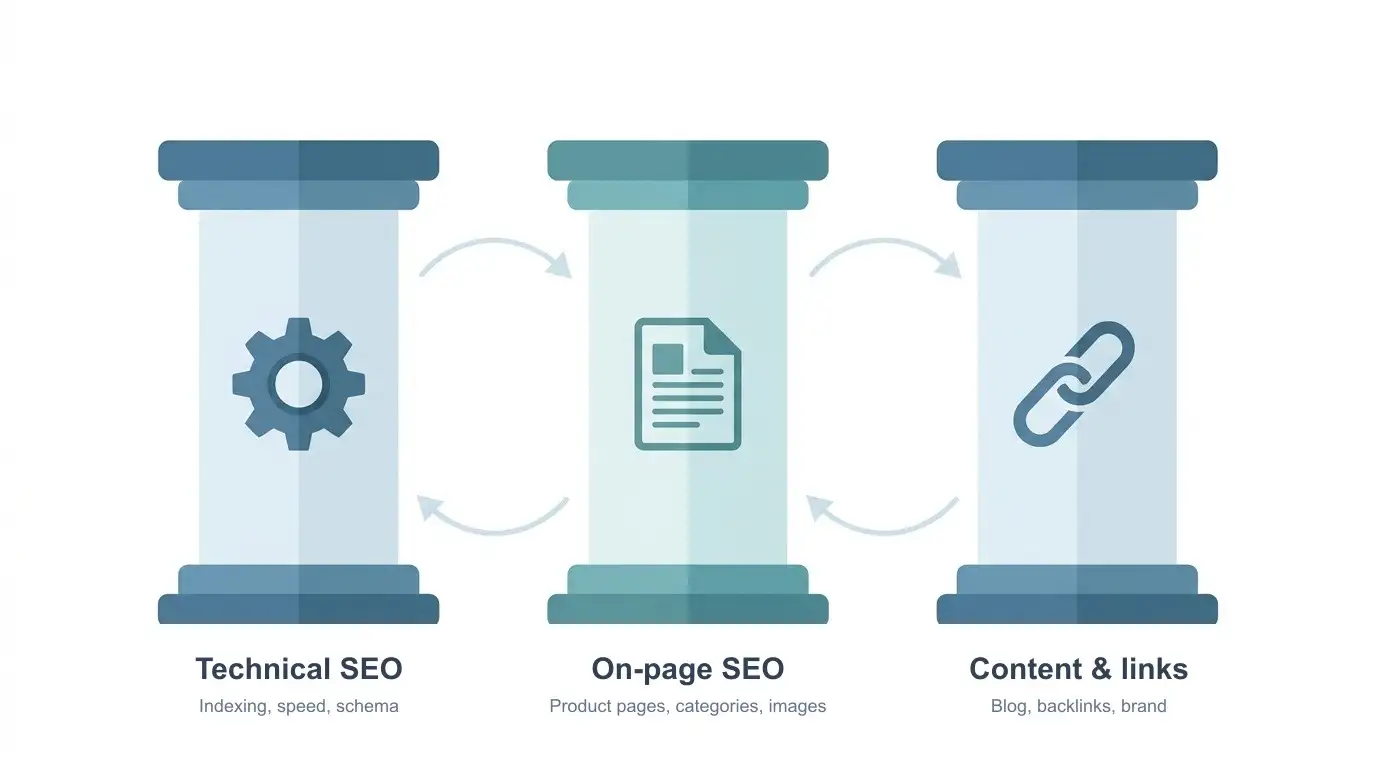
Ecommerce SEO can be divided into three recurring workstreams:
| Area | What you do | Impact |
|---|---|---|
| Technical SEO | Indexation, speed, canonical tags, robots.txt, sitemap and schema | Enables ranking: without the technical base, pages can remain unindexed or be indexed incorrectly |
| On-page SEO | Product pages, categories, internal links, images and URL structure | Defines which keywords the pages can rank for |
| Content and links | Blog content, buyer guides, backlinks and brand mentions | Builds authority and brings informational traffic, some of which later buys |
Start with technical basics because indexation issues reduce the value of everything else. Then move to category pages, because they often produce the strongest ROI. Product pages and content marketing come next.
Keyword research for ecommerce
Keyword research is the foundation of ecommerce SEO. Without it, optimization becomes guesswork, and guesswork usually points the work at the wrong pages.
Ecommerce keyword research defines which pages the store should build. It differs from a regular website because the search landscape is wider. You have product names, categories, brands, features and buying problems that customers use to search.
A keyword map decides whether a query needs a category page, product page, guide or controlled filtered listing. The same keyword should not send three different pages into competition with each other.
| Search type | Example query | Best page type | What to measure |
|---|---|---|---|
| Main category | ”running shoes” | Category page | Organic revenue, CTR, position trend |
| Subcategory | ”women’s trail running shoes” | Subcategory or controlled filtered page | Category conversion rate and indexation |
| Product model | ”Nike Pegasus 40 women” | Product page | Product page traffic, add-to-cart, Product rich results |
| Comparison | ”best running shoes for beginners” | Buying guide or blog post | Clicks from guide to categories and products |
| Problem-led query | ”running shoes for knee pain” | Guide that links to the right categories | Assisted conversions and internal clicks |
Practical process:
-
Map product categories. Write down main categories and subcategories. These are the starting point for keywords: “women’s running shoes”, “wireless headphones”, “ergonomic office chairs”.
-
Check demand with a keyword tool. Google Keyword Planner, Semrush and Ahrefs show monthly searches, competition and CPC. Prioritize keywords with enough demand and realistic competition.
-
Use Google and Amazon autocomplete. Type the category into the search box and look at the suggestions. “Running shoes” may produce suggestions like “running shoes for women”, “running shoes for flat feet” and “running shoes for asphalt”. These are real searches. Amazon autocomplete is especially useful for product-led searches because the intent is closer to buying.
-
Study competitor rankings. Enter a competitor domain into Semrush or Ahrefs and review the keywords they rank for. This often reveals terms you would not have found internally.
-
Choose one primary keyword per page. Use broader terms for categories, such as “men’s running shoes”, and more specific terms for product pages, such as “Nike Air Zoom Pegasus 40 men’s”. Long-tail keywords usually convert better because they reveal more specific buying intent.
Prioritize by page type. Not every keyword needs a blog post. Often the best target page is a category, subcategory or product page.
| Search type | Best target page | What to optimize first |
|---|---|---|
| Broad product search, such as “headphones” | Main category | H1, title, category description, subcategories, internal links |
| Feature search, such as “noise cancelling headphones” | Subcategory or controlled filtered page | Listing that matches demand, canonical strategy, short buyer guidance |
| Product or model search, such as “Nike Pegasus 40” | Product page | Unique description, Product schema, images, availability, reviews |
| Comparison or problem search, such as “how to choose running shoes” | Blog post or buyer guide | Clear answer, comparison tables, links to relevant categories |
This prevents cannibalization. If the same query targets a category, blog post and product page at the same time, Google may not know which page matters most.
URL structure helps search, usability and analytics. Google recommends descriptive, readable URLs instead of long ID numbers and unnecessary parameters. For example, store.com/womens-running-shoes/ is clearer than store.com/cat123/subcat456/.
For product pages, the right choice depends on the store structure. A category path in the product URL, such as store.com/running-shoes/nike-air-zoom-pegasus-40/, can help quick GA4 segmentation and audience building if categories are stable and the product clearly belongs to one main category. If products belong to several categories or the category tree changes often, a category-independent URL such as store.com/product/nike-air-zoom-pegasus-40/ is usually easier to maintain and creates fewer redirect and duplicate URL risks.
For analytics, still send categories to GA4 separately through fields such as item_category, item_category2 and item_category3, or through page-level dataLayer values. That way you can build audiences from the product groups a user viewed even when the permanent product URL does not contain the full category path. Keep the same URL in internal links, sitemap and canonical tags.
Example keyword map for a small online store:
| Page type | Keyword | Search volume | Competition |
|---|---|---|---|
| Category page | ”women’s running shoes” | 6,000/mo | High |
| Subcategory page | ”women’s trail running shoes” | 590/mo | Medium |
| Product page | ”Nike Pegasus 40 women” | 320/mo | Low |
| Blog page | ”how to choose running shoes” | 1,300/mo | Low |
Notice how long-tail keywords are less competitive and more targeted. Start there when the store does not yet have enough authority to compete for the broadest terms.
Avoid this common mistake: do not use the same keyword on several pages. This causes cannibalization, where your own pages compete against each other in search results.
Buying journey and search intent
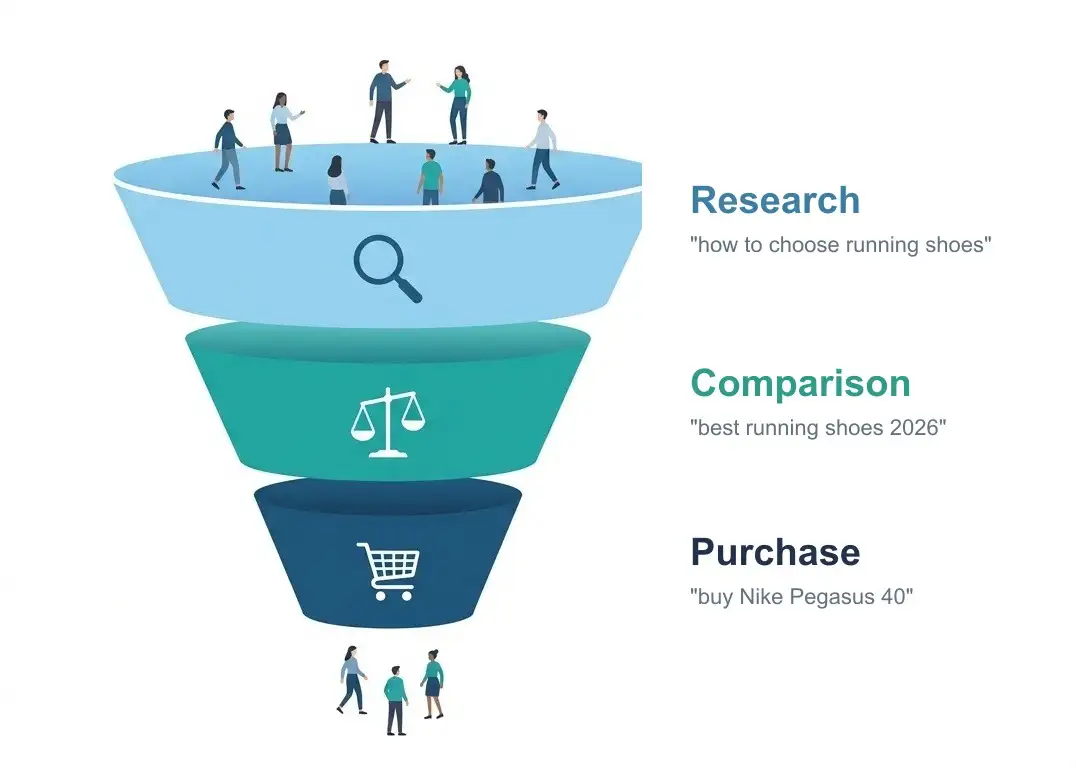
Ecommerce SEO starts with understanding the buying journey. The same product can be connected to very different searches.
Three stages:
1. Information search: The customer does not yet know what they want. They search for guides, comparisons and general information.
- Example queries: “how to choose running shoes”, “best garden tool for beginners”
- Content type: blog posts, guides and practical lists
- These searches rarely produce immediate sales, but they bring people into the top of the buying journey
2. Comparison: The customer knows the category but compares options.
- Example queries: “best running shoes 2026”, “Nike vs Asics running shoes”, “wireless headphones reviews”
- Content type: comparison articles, “best X” lists and reviews
- These searches are valuable because the purchase decision is closer
3. Purchase: The customer knows exactly what they want and is looking for a place to buy.
- Example queries: “buy Nike Pegasus 40”, “wireless headphones sale”, “office chair price”
- Content type: product pages, category pages and offer pages
- These searches often convert best and should lead directly to product and category pages
An online store needs all three: blog content for information search, comparison content for evaluation, and optimized product and category pages for buying intent.
Category page optimization
Category pages are often the most important part of ecommerce SEO because they can rank for broader, higher-volume commercial keywords such as “women’s running shoes”, “garden tools” or “ergonomic office chairs”.
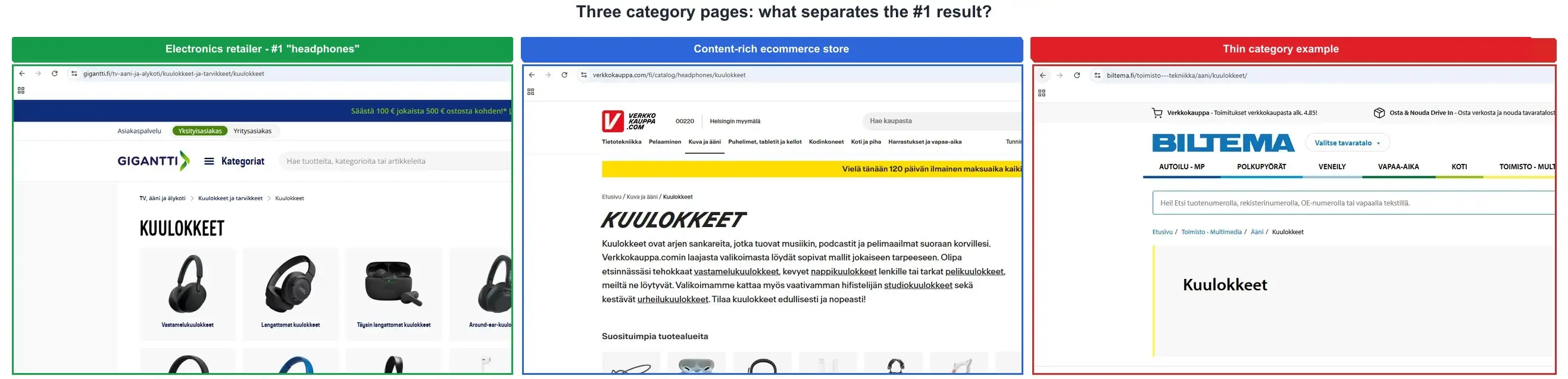
A live SERP for a broad product query such as “headphones” is usually commercial and transactional. The top results are not guides or blog posts. They are category pages from online stores, device retailers and manufacturer sites.
| Position | Page type | Why Google may rank it |
|---|---|---|
| #1 | Specialist or major retailer | Strong topical authority, direct category match and title that covers important headphone types |
| #2 | Device retailer or telecom store | Device sales plus clear buying intent, H1 that matches the query and useful category copy |
| #3 | Large retailer | Strong domain, product selection and commercial search result presentation |
| #4 | Marketplace or broad retail brand | Large selection, category context, subcategory links and brand trust |
| #5 | Manufacturer category | Entity authority because Google connects the brand closely with the product category |
Why do rankings differ? Page-level backlinks rarely explain the whole result. A category page can rank ahead of a competitor that has more links if Google sees the winning site as a stronger topical source for that product category.
Domain authority alone does not explain ecommerce SERPs. A broad retailer can have a strong domain and still lose to a more relevant category specialist. Search engines do not rank a page only because the domain is large. They also evaluate topical fit, page content, internal links, search result relevance and the strength of related pages across the site.
One likely factor is topical authority: how strongly Google connects the site with selling that product category. A retailer that ranks across related searches such as “noise cancelling headphones”, “bluetooth headphones”, “wireless headphones”, “earbuds” and brand-specific headphone terms sends a stronger category-level signal.
On-page work still matters. A category page with useful copy, internal links, frequently searched links and a buyer guide can outperform thinner pages. But if another store has a stronger brand signal in that exact product category, content alone may not be enough to overtake it.
The lesson for SMB online stores: collecting backlinks alone is not enough. Build topical authority in your own product category: deep category content, useful product descriptions, subcategories, buyer guides and comparisons around the same theme. If Google recognizes the store as a strong source for a product category, you can earn ranking advantages that a larger but less specialized competitor cannot always copy.
An optimized category page includes:
- H1 = the main category keyword, such as “Women’s running shoes”
- Short category copy of 150 to 300 words at the top or bottom of the page, explaining what the category contains, who it is for and how to choose
- Product listing in a useful order, such as bestsellers, newest items or offers
- Visible subcategories as internal links
- Breadcrumb navigation and BreadcrumbList schema
- Pagination handled correctly through a consistent canonical and pagination structure
Taxonomies create additional visibility. Product categories alone are not enough in larger stores. Add useful classification such as color, material, use case and brand. If keyword research shows that “black leather boots” has separate demand, create a controlled listing page for it. These taxonomy-based pages can rank for long-tail keywords with lower competition.
Separate these structures clearly:
| Structure | Example | SEO policy |
|---|---|---|
| Main category | running-shoes | Indexable because it answers broad commercial demand |
| Subcategory | womens-running-shoes | Indexable if there is demand and enough product selection |
| Filter or attribute | ?color=black&size=8 | Usually not indexable unless the combination answers clear demand |
| Brand page | nike-running-shoes | Indexable if the brand is searched and the store has several products |
A poor structure appears when every filter creates an indexable URL. A better structure turns only search-relevant combinations into controlled landing pages and keeps the rest behind canonical or noindex rules.
Own offer searches. Create an offers page and product-group offer pages that update automatically. Seasonal searches such as Black Friday, holiday gifts or clearance terms are easier to win with persistent pages that are updated each year.
Do not do this: do not write category text only for SEO. Google may process a 600-word block below a product listing, but the buyer often will not read it. If longer copy is needed, place it below the product listing and keep the top of the page useful for shopping.
Product page optimization
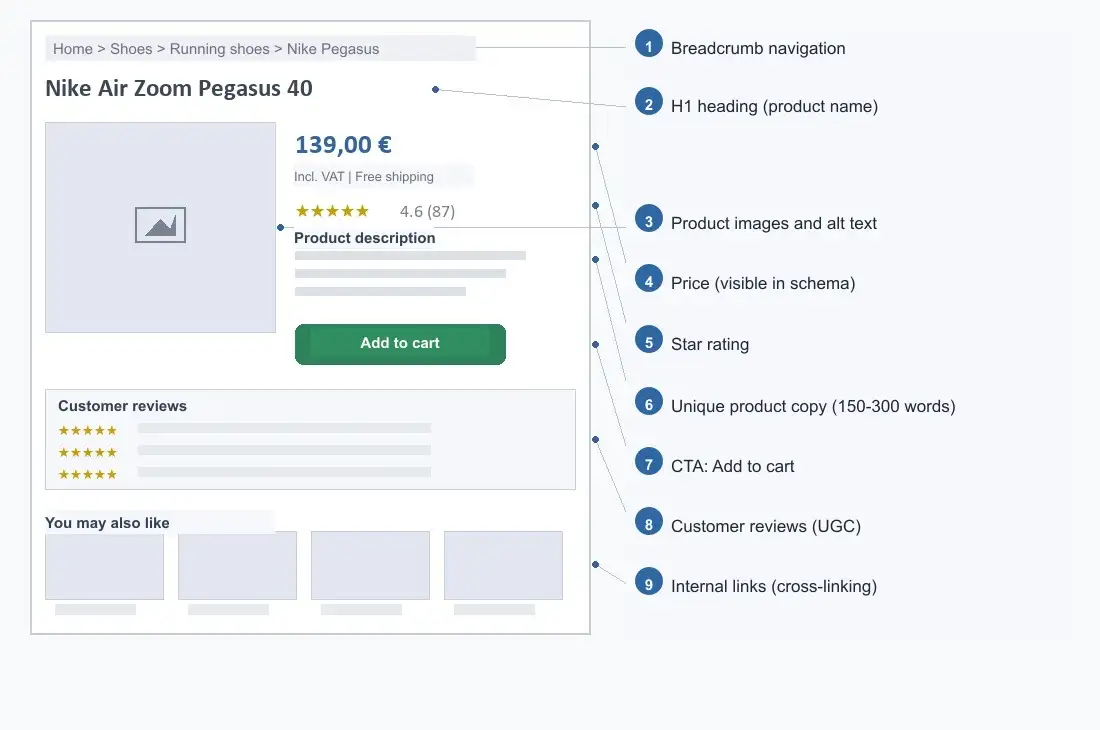
A product page has two jobs at the same time: rank for product-led searches and make the visitor comfortable enough to buy. An optimized product page includes:
- Title tag: product name plus main keyword plus brand. Keep it under roughly 60 characters when possible. Add a differentiator such as free shipping or lowest price if it is true.
- Meta description: 140 to 155 characters with price, USP and CTA. Google often rewrites it, but a strong description can help CTR.
- H1 heading: the full product name. It does not need to be identical to the title tag.
- Unique product description: at least 150 to 300 words. Do not copy supplier text. Explain benefits, use cases and technical details in your own words.
- Images with alt text: “Nike Air Zoom Pegasus 40 men’s blue running shoe, side view” is more useful than “product-photo-1.jpg”.
- Product schema JSON-LD: price, availability and reviews when available.
- Customer reviews: reviews add unique content and improve conversion. They also include natural language that can support long-tail relevance.
- Internal links: link to the category page, related products and useful buying guides.
Common mistake: using supplier product text as-is. If the same copy appears in hundreds of stores, Google may choose one version and give the others less visibility. Rewrite at least most of the copy in your own language.
Out-of-stock and discontinued products: When a product is temporarily out of stock, do not delete the page. Show that it is unavailable and recommend alternatives. If the product is permanently removed, use a 301 redirect to the closest replacement or parent category. Preserve pages that have traffic or backlinks.
Variants: Do not create a separate page for every color, size or package variant unless there is clear search demand. Handle variants on the same product page to avoid duplicate pages and diluted ranking signals.
Internal linking in ecommerce
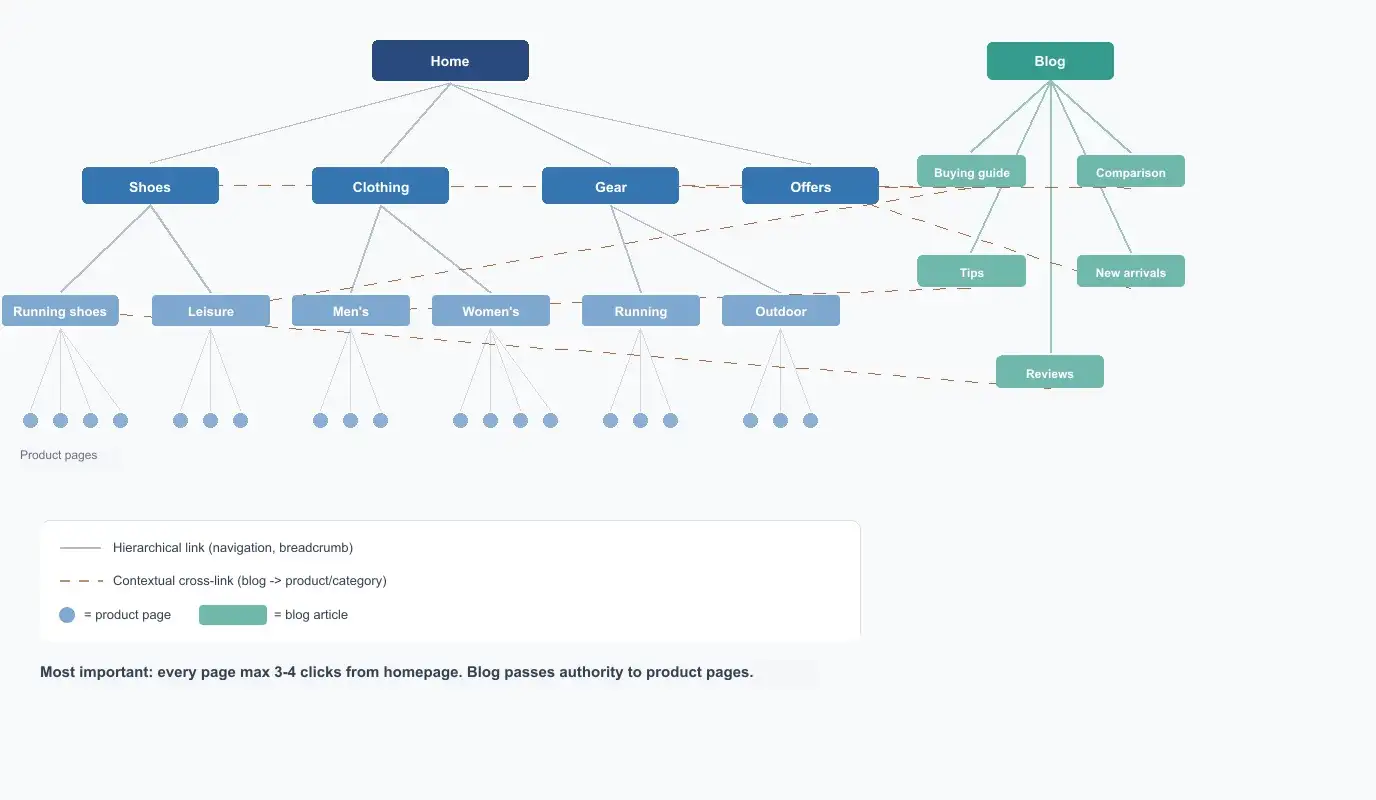
Internal linking is one of the most underrated ecommerce SEO levers. Good internal linking helps search engines find important pages and routes link equity to the pages where it matters most.
Principles:
-
Shorten click paths. Every important page should be reachable within 3 to 4 clicks from the homepage. If a product page is 6 clicks away, Google may treat it as less important.
-
Use mega menus carefully. A mega menu can shorten paths to subcategories, but design it for users first. Include the most important subcategories, not everything.
-
Cross-link contextually. Product pages should link to related products, accessories and compatible items. Category pages should link to related categories. This is not only SEO work. It can also improve conversion rate and average order value.
-
Link from blog content to products and categories. A guide such as “How to choose running shoes” should naturally link to the running shoe category. This moves authority and guides the reader toward buying.
-
Use descriptive anchor text. “Explore men’s running shoes” is more useful than “click here”. Google uses anchor text to understand the target page.
-
Use breadcrumb navigation. Breadcrumbs support internal linking, help users move through the hierarchy and can produce clearer search result structure through BreadcrumbList schema.
Content marketing and blog content
Product and category pages are not enough. An online store that publishes useful content reaches buyers before they know exactly what they want to buy.
Why blog content is worth doing:
- Blog posts cover search intent that product and category pages do not serve, such as research and comparison
- Useful articles attract backlinks more naturally than product pages
- Blog content can send readers to product pages through internal links
What to publish:
| Content type | Example | Buying journey stage |
|---|---|---|
| Buying guides | ”How to choose the right running shoes” | Information search |
| Comparisons | ”Nike vs Asics: which is right for you” | Comparison |
| Best-of lists | ”Best wireless headphones 2026” | Comparison |
| Problem solving | ”Why running shoes cause knee pain” | Information search |
| Seasonal and gift ideas | ”Gift ideas for runners” | Purchase |
| Reviews and experiences | ”Field test: winter running jacket” | Comparison |
Build the content plan around categories, not isolated blog ideas. If the most important category is “running shoes”, the blog should support that category: buying guides, comparisons, use cases, care instructions and seasonal content link back to the right categories and products.
| Sales page | Supporting content | Internal linking goal |
|---|---|---|
| Running shoes | How to choose running shoes, best running shoes for beginners | Send information seekers to the main category |
| Women’s running shoes | Women’s running shoe size guide, shoes for asphalt running | Support subcategory relevance |
| Nike Pegasus 40 | Review, comparison with previous model, care instructions | Strengthen product page buying arguments |
This turns the blog into a sales-supporting system. Without a plan, a blog easily collects traffic from topics that have no clear connection to the product range.
Practical tip: do not delete seasonal pages after the season. Keep a Black Friday page live and update it every year. Between seasons, use it to collect email subscribers or explain when offers return.
Publishing pace: for an SMB online store, 1 to 2 strong articles per month is enough. Quality beats volume. One thorough buying guide that ranks is worth more than ten shallow posts.
Measure the impact. In GA4, track how many blog readers move to product pages and how many buy. This shows which articles produce revenue, not just traffic.
Link from articles to the product and category pages that naturally relate to the topic. Without internal links, the blog becomes an isolated island that does not move traffic or authority toward sales.
Technical SEO for ecommerce
Technical issues are more common in ecommerce than on traditional business sites. Review these areas carefully.
1. Duplicate content from faceted navigation
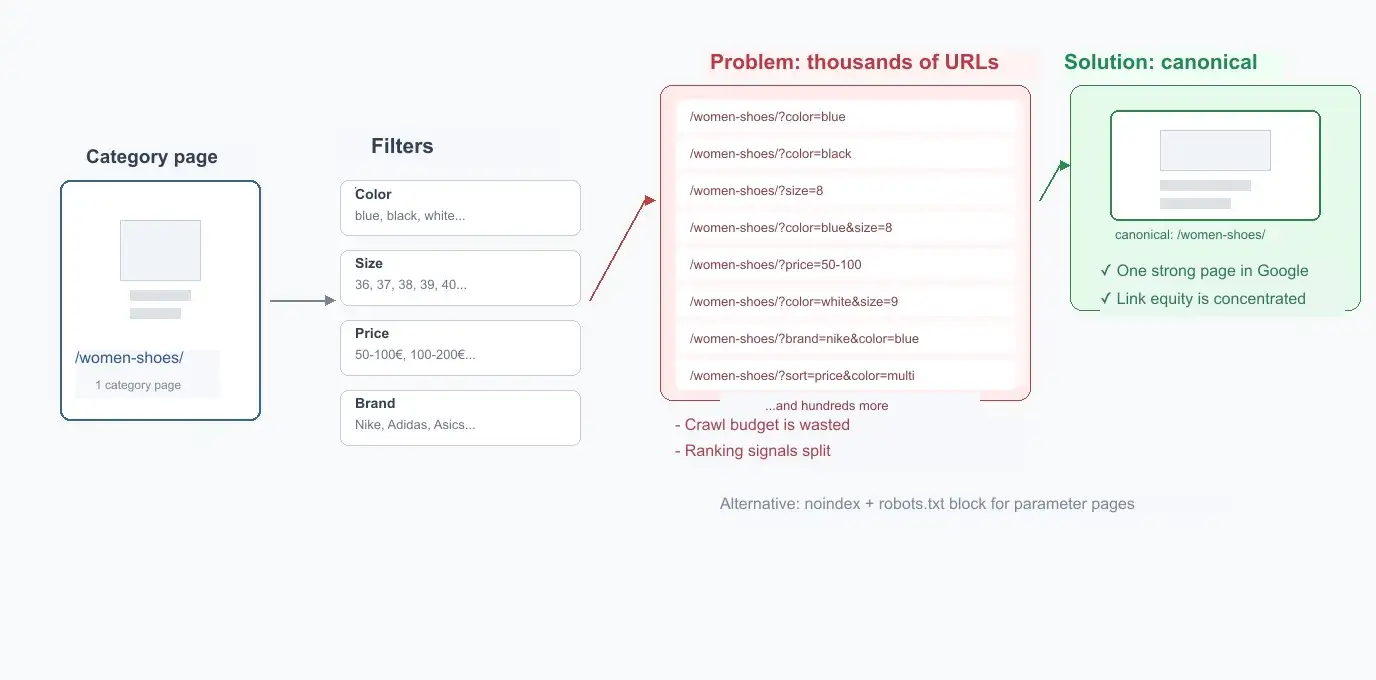
When a buyer filters a listing by size, color or price, the store often creates new URLs such as /category?color=blue&size=42. Google may crawl and partially index these URLs. Thousands of near-identical pages can dilute ranking signals.
Solutions, in a practical order:
- Canonical tag points to the main page. This is usually the easiest start.
- Robots.txt blocks crawling of parameters. This prevents crawling, but not always indexation.
- Noindex, follow on parameterized pages. This is the clearest way to prevent indexation.
- Selective indexation: If a filter combination answers real demand, such as “men’s black leather shoes”, let it index with a self-referencing canonical. Block the rest.
2. Out-of-stock products
When a product is unavailable, do not delete the page automatically. Better options:
- Show “out of stock” and recommend alternatives
- If the product is permanently discontinued, redirect to the closest category or replacement product
- Preserve pages that have traffic or backlinks
3. Site speed
Ecommerce conversion is sensitive to speed. Many conversion studies connect slower loading with weaker conversion, even though the size of the effect varies by industry, device and user situation. Check Core Web Vitals with PageSpeed Insights.
Common issues:
- Large product images
- Too much app or plugin JavaScript
- Missing caching or CDN setup
- Slow hosting
4. Sitemap and robots.txt
Product pages should usually stay in the sitemap. Robots.txt must not block CSS or JavaScript that Google needs to render the page. Make sure important category pages are not blocked.
5. Mobile experience
Many stores receive a large share of traffic from mobile. Google uses mobile-first indexing, so the mobile version is critical. Check whether CTAs are easy to tap, filters work properly and images load quickly.
6. URL structure
A good URL structure helps both search engines and users. Prefer a logical hierarchy:
- Category page:
store.com/womens-running-shoes/ - Product page:
store.com/product/nike-pegasus-40/ - Blog:
store.com/blog/how-to-choose-running-shoes/
You do not always need to include the category in product URLs. If categories change often or a product belongs to several categories, a stable product URL is usually safer. If the category path supports analytics and the structure is stable, it can be justified.
7. HTTPS
SSL is effectively mandatory for ecommerce. It protects customer data, builds trust and is part of the basic standard for modern online stores. Without HTTPS, Chrome may show a “not secure” warning, which damages trust.
Product schema and rich results
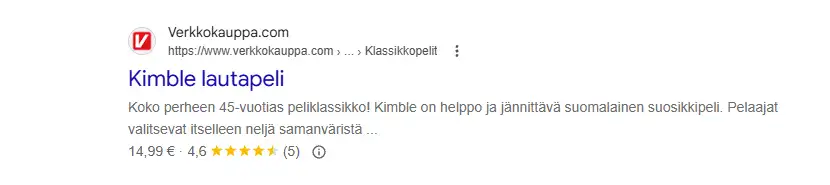
Product schema makes a product page eligible for rich results in Google. Search results may show price, star rating and availability.
Example Product schema in JSON-LD:
{
  "@context": "https://schema.org",
  "@type": "Product",
  "name": "Nike Air Zoom Pegasus 40",
  "image": "https://store.com/image.jpg",
  "description": "Lightweight running shoe for daily training.",
  "sku": "NIKE-AZP40-BLUE-42",
  "brand": { "@type": "Brand", "name": "Nike" },
  "offers": {
    "@type": "Offer",
    "price": "139.00",
    "priceCurrency": "EUR",
    "availability": "https://schema.org/InStock",
    "url": "https://store.com/product",
    "shippingDetails": {
      "@type": "OfferShippingDetails",
      "shippingDestination": {
        "@type": "DefinedRegion",
        "addressCountry": "US"
      },
      "shippingRate": {
        "@type": "MonetaryAmount",
        "value": "4.90",
        "currency": "EUR"
      },
      "deliveryTime": {
        "@type": "ShippingDeliveryTime",
        "handlingTime": {
          "@type": "QuantitativeValue",
          "minValue": 0,
          "maxValue": 1,
          "unitCode": "DAY"
        },
        "transitTime": {
          "@type": "QuantitativeValue",
          "minValue": 1,
          "maxValue": 3,
          "unitCode": "DAY"
        }
      }
    },
    "hasMerchantReturnPolicy": {
      "@type": "MerchantReturnPolicy",
      "applicableCountry": "US",
      "returnPolicyCategory": "https://schema.org/MerchantReturnFiniteReturnWindow",
      "merchantReturnDays": 30,
      "returnMethod": "https://schema.org/ReturnByMail",
      "returnFees": "https://schema.org/FreeReturn"
    }
  },
  "aggregateRating": {
    "@type": "AggregateRating",
    "ratingValue": "4.6",
    "reviewCount": "87"
  }
}
Important rules:
- Reviews must be real and visible to users on the page. Otherwise rich result eligibility can suffer.
- The price in structured data must match the visible page. Misleading or conflicting structured data can lead to rich result loss or manual action.
- Do not add review markup for reviews that are not actually about the product on the page.
shippingDetailsandhasMerchantReturnPolicyare optional, but Google recommends them and they can improve product result visibility.- Add BreadcrumbList schema at least to important hierarchical pages such as categories and products.
Google Merchant Center and Shopping results
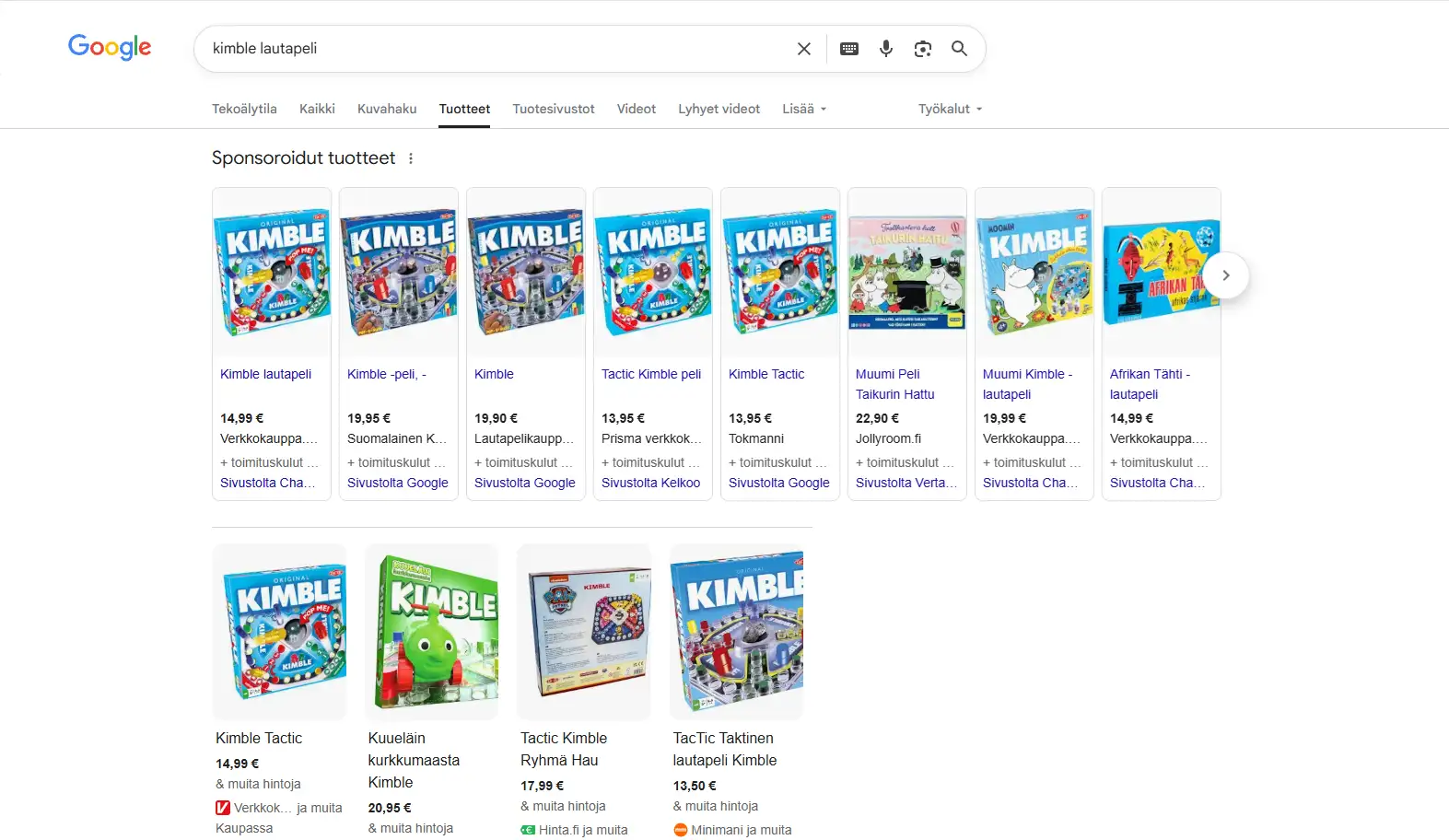
Google Merchant Center is a free tool that can make products appear in Google Shopping results and product listings in image search and other Google surfaces. Many SMB online stores still use this incompletely. For SEO, clean product feed data helps Google understand names, prices, availability and images more reliably.
Why it is worth doing:
Google’s results pages include more visual product listings, especially for product searches. When your product data is in Merchant Center, products can appear in free listings without ad spend. This does not replace paid advertising, but it can add extra visibility.
How to start:
- Create a Google Merchant Center account and verify website ownership.
- Submit product data such as name, price, image, availability and description through a product feed.
- Make sure feed data matches the visible product page.
- Monitor Merchant Center for product visibility and errors.
Shopify can generate the feed through the Shopify and Google integration. WooCommerce usually needs a plugin such as Google Listings & Ads. MyCashflow supports native product feed generation.
Merchant Center product data works together with Product schema. When both are clean, Google can show product information more richly across search surfaces.
Image and video optimization
Image search is a more important traffic source for ecommerce than for most websites. Google shows product images in regular search results and in image search.
Product image optimization:
- Add alt text to each useful image. Describe the product clearly: “Nike Air Zoom Pegasus 40 men’s blue running shoe, side view”. Avoid generic text such as “image1” or “product photo”.
- Use descriptive filenames.
nike-air-zoom-pegasus-40-blue.webpis better thanIMG_4523.jpg. - Use WebP and the right dimensions. Compress images before uploading. Use responsive image attributes so mobile does not download unnecessarily large files.
- Use several images per product. Show angles, details and the product in use. Include at least one clean image on a simple background.
- Consider an image sitemap. An image sitemap helps Google discover important product images, especially when images are loaded through JavaScript or a CDN.
Videos: YouTube is an important search channel in many product groups. If you create product videos, such as unboxings, tutorials or comparisons, optimize titles, descriptions and tags. Embed videos on product pages. A good video can improve both search visibility and conversion.
Link building for ecommerce
External links remain an important authority signal. Link building is often harder for ecommerce than for blogs because people rarely link naturally to product pages.
Working strategies for an online store:
-
Product reviews and experiences. Offer products to bloggers or creators for honest review. Do not ask for links as payment. If the product is useful, the link may come naturally.
-
Guest contributions. Write expert articles for industry publications and blogs. A running gear store could offer an article on how to choose running shoes to a sports publication.
-
PR and media contacts. New products, campaigns and industry trends can become news. Local and trade media often link to sources.
-
Unlinked mentions. Find mentions of your brand or products without a link. Contact the publisher and ask them to add the link. This is one of the easiest link opportunities.
-
Competitor analysis. Review where competitors earn links and target the same relevant sources. Semrush and Ahrefs can show competitor backlinks.
-
Content as a link asset. Create research, comparisons, calculators, tools or visual resources that others want to reference. For example, a price comparison study for a product category can earn media links.
Relevant link opportunities include industry associations, local business networks, trade media, bloggers, creators and comparison sites. Directory links can provide basic citations, but they are rarely enough on their own.
Tracking and measurement
Ecommerce SEO without measurement is like driving without a dashboard. You do not know what works, what fails or where resources should go.
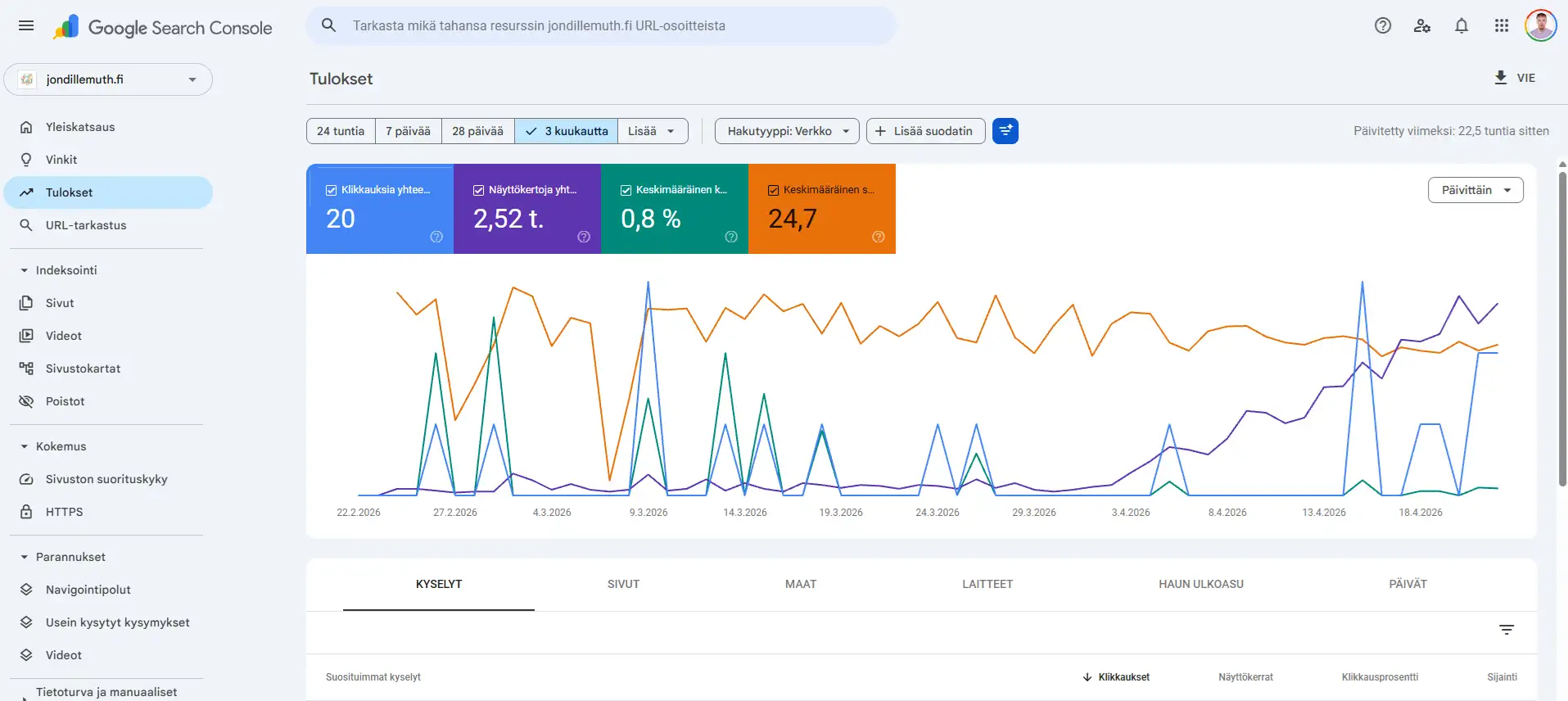
Three required tools:
1. Google Search Console
- Shows which queries make the store appear in search results
- Reveals indexing errors, 404s, canonical issues and crawl problems
- Tracks clicks, impressions, average position and CTR
- Shows page-level data so you can see which product and category pages receive traffic
2. Google Analytics 4
- Connects organic traffic to revenue
- Shows user paths from landing page to product browsing and purchase
- Enhanced ecommerce tracking shows conversion rate from organic traffic
3. Rank tracking
- Tracks priority keyword positions weekly
- Compares your rankings with competitors
- Identifies “striking distance” keywords in positions 5 to 15 where a small improvement may bring meaningful traffic
What to review monthly:
| Metric | Source | Why it matters |
|---|---|---|
| Organic sessions | GA4 | Overall growth trend |
| Organic revenue | GA4 plus ecommerce tracking | The most important business metric |
| Priority keyword positions | Rank tracker or GSC | Shows trend direction |
| Indexed pages | GSC | Reveals technical issues |
| Search result CTR | GSC | Shows whether titles and snippets match expectations |
| New backlinks | Semrush, Ahrefs or similar | Authority growth |
Reporting alone does not improve the store. Turn measurement into a monthly development cycle:
- Measure: review organic revenue, priority category traffic, Search Console queries and technical errors.
- Prioritize: choose 3 to 5 pages where a small improvement can produce the most revenue. Good candidates are categories in positions 5 to 15 and product pages with traffic but weak conversion.
- Fix: update the title, description, internal links, product copy, schema or technical blocker based on what prevents growth.
- Publish: add new content only when it supports an important category, product group or buying decision.
- Review again: compare results next month. Ecommerce SEO is continuous iteration, not a one-off campaign.
How ecommerce SEO increases sales
Ecommerce SEO increases sales only when it brings the right searcher to the right page and makes buying easier. The most important metric is not one keyword ranking. It is revenue from organic search, conversion rate and average order value.
Sales impact usually comes from four places:
| Area | How SEO helps | What to track |
|---|---|---|
| Category pages | Bring purchase-ready visitors through broad commercial searches | Organic revenue by category |
| Product pages | Answer exact product searches and reduce uncertainty | Product page conversion rate and add-to-cart |
| Guides and comparisons | Bring buyers into the journey earlier and guide them forward | Clicks from guide to category or product |
| Rich results | Improve search result visibility with price, availability and reviews | CTR, Merchant Center visibility and product listings |
When organic traffic grows without sales, check product range, pricing, delivery terms, trust signals and product page conversion. SEO brings the buyer to the site. The store earns trust on the page.
AI search and ecommerce visibility
Google AI Overviews and AI search tools such as ChatGPT, Perplexity and Gemini are changing search behavior. For ecommerce, this means two things.
1. AI Overviews can reduce clicks.
When Google generates an answer directly on the search results page, some users do not click any result. For ecommerce this is less severe than for pure information sites because purchasing still usually requires a visit to a store.
2. Clear, structured content helps in AI search.
AI systems can use content more easily when it has clear structure: question-answer sections, tables, lists and concrete facts. Category page descriptions and FAQ sections can support this visibility.
Practical actions:
- Add FAQ-style content to product and category pages, such as “How do I choose the right size?” and “What is the warranty?”
- Use tables in product comparisons because AI systems parse them well.
- Make sure Product schema is valid because structured data clarifies product information for machine interpretation.
- Build brand reputation. The more your brand is mentioned across relevant sources, the better its chances of being considered in AI-generated answers.
- Review robots.txt carefully before blocking GPTBot, ClaudeBot or PerplexityBot completely if AI visibility matters to the store.
AI search is unlikely to replace traditional search completely in the near future, but its share will grow. Optimize the store so the same product information serves Google, AI search and buyers.
10 common ecommerce SEO mistakes
- Using supplier product descriptions unchanged. This creates duplicate content and makes Google choose between similar pages.
- Missing canonical rules for faceted navigation. This can create thousands of duplicate URLs and waste crawl budget.
- Category pages that are only product listings. Thin category pages have weaker ranking potential.
- Missing or generic image alt text. “product-1.jpg” does not help search engines or accessibility.
- No Product schema. The page may miss product rich result eligibility.
- Deleting products when they go out of stock. This can lose traffic, links and indexation.
- Ignoring speed. Slow pages hurt conversion and can affect Core Web Vitals.
- Only product pages, no informational content. The store misses buyers earlier in the journey.
- Internal links only through navigation. The store lacks contextual links from product, category and blog content.
- No measurement in GA4 and GSC. Decisions go to the wrong pages because nobody knows what works.
Platform notes
Shopify
- Use an SEO-friendly theme such as Dawn or Sense.
- SEO Manager or Yoast SEO can help with metadata and schema.
- Shopify handles many canonicals automatically, but faceted pages still need attention.
- The blog system is separate. Use it intentionally or publish guides on a dedicated content section.
- Google Merchant Center integration is built in.
WooCommerce
- Use Rank Math or Yoast SEO for metadata and Product schema.
- Keep WooCommerce and WordPress updated because security and speed are critical.
- Slow WooCommerce stores are common. Use good hosting and caching.
- Google Listings & Ads can handle the Merchant Center product feed.
MyCashflow
- MyCashflow is a Finnish ecommerce platform with solid basic SEO features.
- Product URL structure is not as flexible as in fully custom systems, so product group structure matters.
- Category and product descriptions can be written through the editor.
- Product feed support for Merchant Center should be checked from platform settings.
Summary: how to start
Start ecommerce SEO in this order:
- Do keyword research and map which queries belong to category and product pages.
- Run a technical audit with Screaming Frog, Google Search Console and PageSpeed Insights.
- Fix critical technical issues such as canonical tags, speed and indexation.
- Optimize the top 10 category pages with H1s, copy, internal links and taxonomies.
- Optimize the best-selling 20 to 50 product pages with copy, images and schema.
- Submit products to Google Merchant Center for free Shopping visibility.
- Start content marketing with 1 to 2 buyer-focused guides per month.
- Measure and repeat monthly: rankings, organic traffic and organic revenue.
If you want help building an ecommerce SEO strategy, see my SEO consulting service or contact me directly.